Free for personal use
For you and your family, non-commercial.
€0forever
- Every feature, with no time limit
- Free updates
- On your own server
Kanban on your server · one-off payment
Pizarro is a Kanban board you install on your own server: tasks, comments and release notes, with no subscription and no per-person fee. Free for personal use, and €100 once for work.
Try it for free See how it works
Why Pizarro
Project apps grow every year: more menus, more options and a bill that goes up with every person you invite. Pizarro goes the other way: it does a few things, does them well, and it's yours.
A board, columns and cards. Anyone opening it for the first time knows what to do, with no training and no manual.
No subscription and no per-user fee. Updates are free forever.
It lives on your own server, with no trackers, and it never leaves. With encrypted backups.
How it works
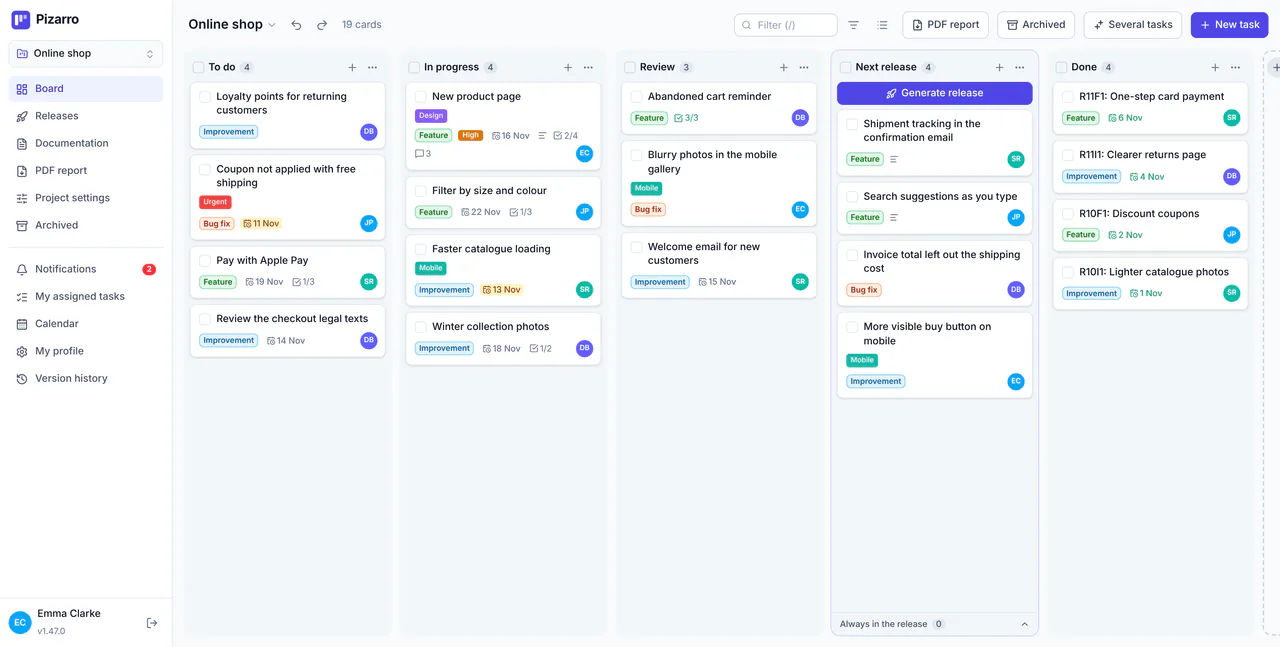
Just what you need to get organised, done well. These screenshots are of the real app.
Tasks
Each column is a stage and each card is a task. Drag them along as they progress; open one and the description, subtasks, files and conversation are all in one place.

Release notes
When a batch of work is ready, click “Generate release”: Pizarro gathers the finished tasks, groups them by type, gives each a code and adds your header and footer. You look it over, copy it, and it's saved in the history.

Collaboration
Comment on the task and mention someone with @: they get a notification in the app or by email. What someone else changes shows up on your screen straight away, without reloading.

Mobile and voice
Pizarro installs from the browser as an app on Android, iPhone and desktop. On your phone you see one column at a time and swipe between them. And if you don't feel like typing, dictate the task.


Privacy
Pizarro runs on a server that belongs to you or your company. There's no cloud in between and no analytics: what you write stays there.
Automatic and encrypted, on the server itself or in separate S3 storage.
With an authenticator app or by email; required for administrators.
No ads, no analytics, no third-party cookies. This website has none either.
Export a whole project with its tasks and files, or bring your boards over from Trello or a CSV file.
No add-ons and no plans: everything is included from day one.

Drag tasks from one day to another and subscribe from your phone's calendar.
Your daily inbox with what you're handling across every project.
Each project's documents and files, right next to its tasks.
The project's status on one page, also by email every week.
Dated milestones and their progress, in the calendar and in the report.
Every day, week or month, without creating them again.
Create and describe tasks by speaking, without typing.
Installs from the browser as an app, on Android, iPhone and desktop.
Create a document from the task and it stays linked to it.
Move, delete or archive: everything can be undone.
Light or dark, and the accent colour each person prefers.
Everyone uses Pizarro in their own language.
For a few people who want to get on the same page without setting up a huge tool.
Software teams, agencies and studios of a few people. From the first note to the published version, release notes included.
“Software team” example: ideas, review and releases.
Jobs per client with their cost and hours, quotes that add themselves up, and private projects for your own things.
“Business and clients” example: quotes and jobs.
The shopping list, doctor's appointments and household chores, with routines that repeat every week. Free for personal use.
“Family and home” example: shopping, appointments and routines.
When you create a project you can start from a ready-made example, with its columns and sample cards.
Both options include every feature: the only difference is what you use Pizarro for.
For you and your family, non-commercial.
€0forever
Companies, freelancers and professionals, associations, schools and any other organisation.
€100 + VATone-off payment per server
Meanwhile you can use Pizarro as normal: the licence relies on good faith.
No. Invite whoever you want; the limit is your server.
Use by an individual on their own server, for personal, household or family purposes: organising the home, your hobbies or your own non-commercial projects. If you use it in a company, as a freelancer or professional, or in any organisation (including associations, NGOs, public bodies and schools), you need a licence.
Pizarro works exactly the same: there is no trial version, no cut-down features and no expiry date. The licence relies on good faith. If you use it for work, buying it (€100 + VAT, once) is what keeps it improving.
No. Nothing is ever blocked, and the licence is never checked over the internet.
A Linux machine with Docker and 1 GB of RAM. You can also deploy it on Railway.
By running the install command again, which keeps your data. The app tells administrators when a new version is out.
Installation
On Linux with Docker, 1 GB of RAM and a domain pointing at the server, a single command installs Pizarro with its database and HTTPS. Running it again updates it and keeps your data.
curl --proto '=https' --tlsv1.2 -fsSL https://raw.githubusercontent.com/pla87/pizarro/main/deploy/get.sh | sh -s -- --domain pizarro.example.com